C#: Using LINQ and Structures

In today’s blog I’ll be going over LINQ, a very powerful feature of C#. LINQ lets you write SQL- esque statements directly into the code. I will also be going over structure types. Structures or structs are a means of data encapsulation much like objects but there are some differences between the two. Anyway, enough preamble let’s get started!

Structure Types

Structs function much like classes, they can have fields, getters/setters and can contain helper methods. There are a few caveats though as we shall soon see. Using the keyword “struct” just like we use the keyword “class”, we can declare structure type. Below is a basic struct called “Coordinate” that contains an X value, a Y value, a constructor and a set of properties for the two fields.
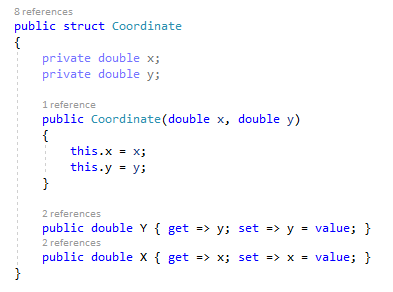
It looks identical to a class and you could swap “struct” with “class” without having to change anything else. So then why use structs? Well it all comes down to coding style and preferences. Structs are best utilized for designing small data-centric types where functionality and states are abstracted away.

Earlier I mentioned that there were some key differences between a struct and a class. I’ll touch on those now. The main difference is that structs cannot inherit from other structs or classes and therefore a struct will never be a “subclass” or a “superclass” to another struct or class. This makes sense given that structs are just meant to encapsulate data and provide a means of accessing the data in a structured format.

Another difference is a struct cannot have an empty constructor. Unlike a class where the empty constructor assigns the default value of each field, a struct must have its field explicitly assigned. This leads into the last difference I’ll be covering and that is structs must initialize all fields on creation. A default value will never be assigned automatically and it is the programmer’s job to ensure that all fields are initialized.
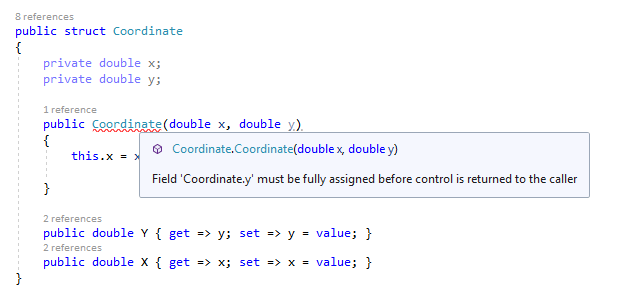
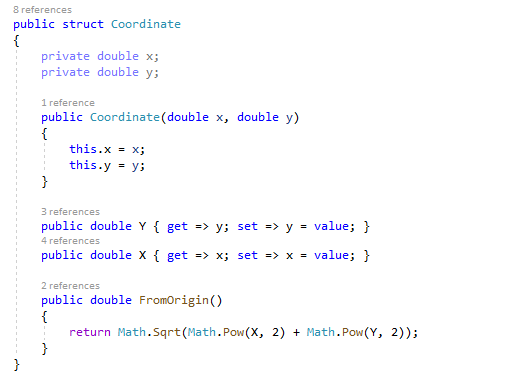
Now let’s see what else we can do with our struct. We can add helper methods and in the case of “Coordinate” I have added a method that calculates the absolute distance from the origin point 0, 0.
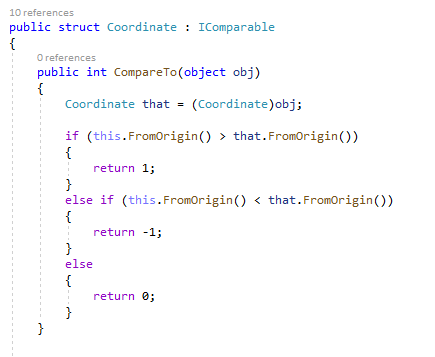
Structs cannot inherit but they can implement interfaces. Below is the “Coordinate” struct that has an IComparable interface implemented.
At this point, one might consider switching from a struct to a class given all the logic we’ve added to it but once again it is up to the programmer’s style and preference.

LINQ

LINQ stands for Language Integrated Query and allows for the usage of queries on data structures in C#. With LINQ you can query a List<T> or Array or even a data source connected to a Microsoft SQL Server. A LINQ query utilizes familiar keywords such as “from”, “select”, “where” and “orderby” to return sets of data based on specified conditions.

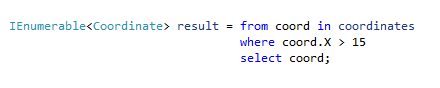
Below is a query run against a list of Coordinates. This query can be split into three parts, the from clause, the where clause and lastly the select clause. Here we are looking for all X values greater than 15.
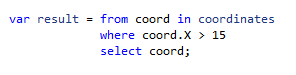
The “from” keyword specifics the data structure to run the query against as well as the name of a single instance from the data structure. “coordinates” is the list of Coordinates and “coord” is the placeholder name for a single Coordinate in the list.

The “where” keyword specifies the condition that the data will be checked against. You can use Boolean expressions here such as >, <, ==, !=, etc. as well as methods that would return a Boolean. Here we use the defined “coord” and call the property for the x value and compare to see if it is greater than 15.

The “select” keyword defines what is returned from the query. Here you can choose the type of data returned. Currently the query is returning structs of type Coordinate as defined by “select coord”. However, if wanted to only return x values we could instead use “select coord.X” and that would return a result of all x values greater than 15 rather than all Coordinates that have an x value greater than 15.

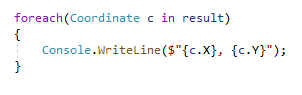
Now that you’ve created a query you’ll want to display the results. Thus far I’ve used a variable of type var to store the results and it is the most convenient way as you do not need to know the exact type. However, knowing the exact return type can be useful. A query returns an IEnumerable<T> where T is the type specified in the select clause.
From here we’ll use a foreach loop to iterate through the results and display them.
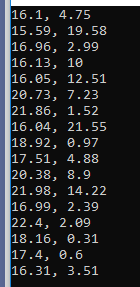
And this is the output, as we can see only Coordinates with x values greater than 15 are displayed.
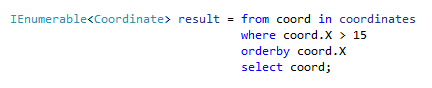
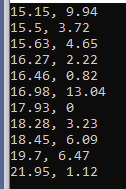
Lastly if you wanted to sort the results by using the “orderby” keyword and specifying the variable you want to sort by. Adding “orderby coord.X” sorts the results by ascending order.
Below is the output and as you can see, the values have been arranged in ascending order.
That covers LINQ and Structure types in C#. I hope you’ve learned something new and thanks for reading. Till next time, see ya!
Basic Features of C#

In today’s blog I’ll be going over some basic features in C#. I’ll touch on nullable types, pointers, and partial classes.

Nullable Variable Type

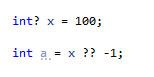
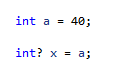
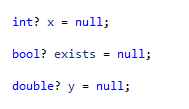
Normally primitive data structures cannot be assigned a value null and doing so will yield a compiler error. C# allows us to assign null by using the ‘?’, placing this on the end of a variable type will denote the variable as being nullable.

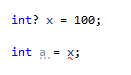
Such a feature can have a practical application like representing a Boolean in a database table where the values can be true, false or null. Now what happens if you want to assign that nullable type to a non-nullable variant.

This will result in a compiler error. In order to assign the value of x to a you need to use the null-coalescing operator ‘??’.

The ‘??’ operator will return the value of left side if it is not null otherwise it will return the value of the right side. So if x is not null return 100 else x is null return -1. It should be noted that you do not need to do this if you are assigning a non-nullable variable to a nullable one.

Pointers

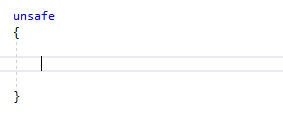
Pointers are a powerful feature that allows for the direct manipulation of data in memory. First and foremost C# by default does not like the usage of pointers. In order to use pointers in a C# program you must explicitly declare an unsafe block.

Pointers can only be declared and used in unsafe blocks. C#’s attitude towards pointers is pretty obvious and pointers in C# are rather limited compared to C and C++. While there are some applications, most things that you can do with pointers in C# can be done using something else in C#. With that out of the way we can finally start using pointers.

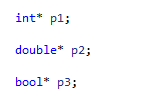
To declare a pointer variable you need to use the ‘*’ character, putting it after the variable type. Pointers can only point to the same primitive type used during declaration.

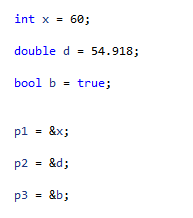
Next we’ll point to some values with our pointers.

The ‘&’ character is known as the address operator in C# and allows for a variable’s memory address to be accessed. We have taken our pointers and pointed them to the address locations of our variables. Now we’ll perform some operations.

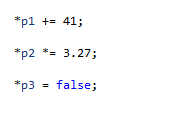
We use the ‘*’ character to dereference our pointers and operate on the variables they are pointing to.

The values have been modified without having to operate on the original variables.

Partial Classes

Partial classes are a very useful feature in C#. It allows for a class to be separated out into multiple components that upon compilation are rendered down into a normal class. These partial classes can even be separated into different files, allowing multiple people to work on them at the same time. And if a class is particularly large you can separate it into different sections for better organization without breaking the class.

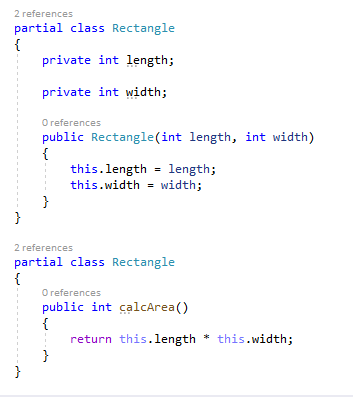
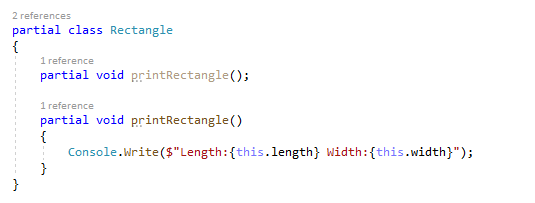
The keyword “partial” denotes a class as a partial class. Any partial classes with the exact same name are merged when the program is compiled.

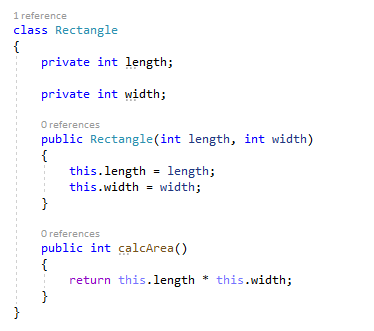
Above are two partial classes called “Rectangle”. The blocks of code are stored in different files but upon compilation the two classes are equivalent to the class below.

You can even have partial methods which are split into two types, the signature and the implementation. Going back to our Rectangle class, we can create and separate a printRectangle() method. All partial methods must be void and therefore will not return anything.

Partial classes can be very useful if implemented properly and in the next blog I’ll be talking about a very powerful implementation of partial classes in the form of Windows Presentation Foundation (WPF). It utilizes partial classes to make GUI construction very easy.

C# has plenty of useful features and the list could go on and on but I will wrap it up here. Next time we’ll see some advanced features of C#. Hope you enjoyed reading and until next time see ya!

A quick comparison of Java and C#

Java and C# share many similarities and often is it easy to learn the other once you’ve learned one of them.

In this post I will be going over some differences between the 2 languages.

Method Differences

C# retains the curly braces and semicolons that Java uses and the main difference in terms of syntax are the methods.

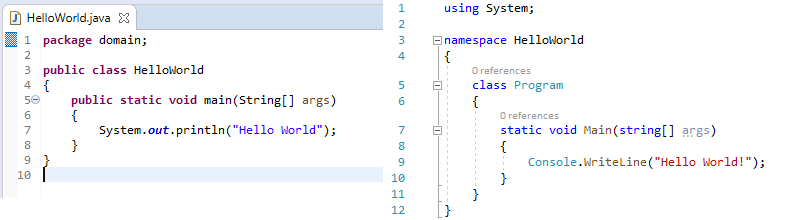
The following is a side by side comparison of a simple Hello World program in Java and C#

As you can see the structure is pretty much the same between the two. The main difference is in how each language prints to the console. With Java you use System.out.println(); while C# uses Console.WriteLine();

Another thing to make note of is the naming convention of methods. Java methods all start with a lowercase while C# methods all start with an uppercase.

The way in which items are printed the console differ as well. In Java if you wanted to print a string along with a variable you would need to concatenate them with “+”.

System.out.println(“X is: ” + x); where x is an integer.

In C# however, formatting is a lot easier, you can place a “$” in the writeLine() argument method and any variable you want to print out can be placed in a set of curly braces.

Console.WriteLine($”X is {x}”); where is an integer.

This is called String Interpolation and does not have an equivalent in Java.

There is also a C# exclusive feature called a verbatim string literal. It utilizes the @ symbol and changes the behaviour when processing strings. For example, when specifying a file path, the “\” character would need to be escaped by add a  “\” in front of it but with @ in C# the program will be instructed to take the string as is.

Without verbatim string literal: string filename1 = “c:\\documents\\files\\text.txt”;

With verbatim string literal: string filename2 = @”c:\documents\files\text.txt”;

Another difference is in how inputs are read from the keyboard. In C# Console.ReadLine() will pause program execution and wait for an input. In Java you must create a new Scanner object with “System.in” as the argument and then call .scanLine() on that object.

import & using

In Java in order to make use of certain objects you would need to import the classes containing that object. To make use of the Scanner object the line “import java.util.Scanner;” would need to be inserted at the top of the class that is using the Scanner object.

In C# the keyword “using” accomplishes this, for example in order to read and write to file “using System.IO” would need to inserted at the top denoting that the class needs to use the classes under System.IO.

Exceptions

Java has two types of exceptions, checked and unchecked. Checked exceptions are checked at compile time and must be handled before the program will compile. Unchecked exceptions are the opposite, they are not checked at compile time. Programmers who use Java must then make the decision to either handle the exception or throw it. However, in C# there are only unchecked expectations and it is up to the programmer on how to handle them.

Getters and Setters vs Properties

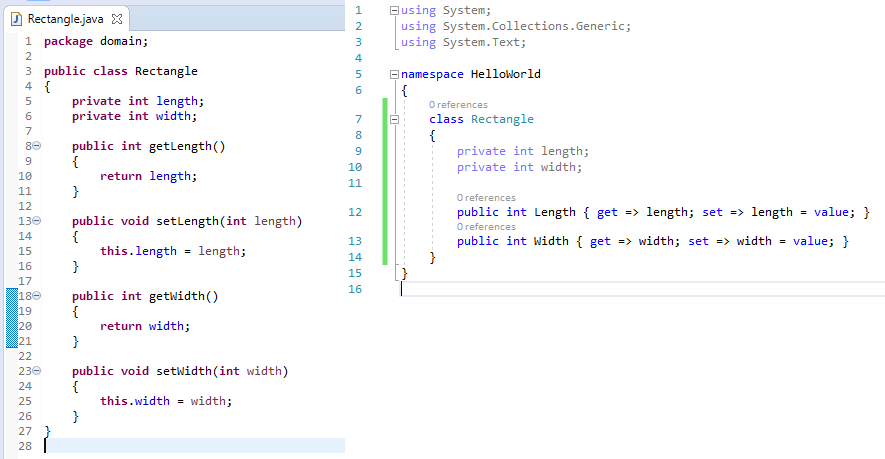
A class with private attributes needs getters and setters in order to access those attributes. In Java getters and setters are the only way to access those private attributes but in C# there exists another way, properties. Properties remove the need for getters and setters by introducing a method that acts like a public attribute allowing for the security of keeping private attributes hidden but the ease of use of a public attribute.

Below is a Java class with getters and setters and a C# class with properties.

C# can still utilize getters and setters but that boils down to a design choice made by the programmer.

C# and Java have many other differences that I have not highlighted here such pointers, passing by reference, partial classes and many others. But C# feels similar enough to Java that learning one after knowing the other is a relatively simple task.

Design a site like this with WordPress.com
Get started