In today’s blog I’ll be going over some basic features in C#. I’ll touch on nullable types, pointers, and partial classes.
Nullable Variable Type
Normally primitive data structures cannot be assigned a value null and doing so will yield a compiler error. C# allows us to assign null by using the ‘?’, placing this on the end of a variable type will denote the variable as being nullable.
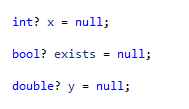
Such a feature can have a practical application like representing a Boolean in a database table where the values can be true, false or null. Now what happens if you want to assign that nullable type to a non-nullable variant.
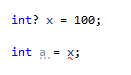
This will result in a compiler error. In order to assign the value of x to a you need to use the null-coalescing operator ‘??’.
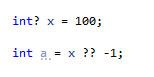
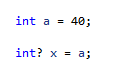
The ‘??’ operator will return the value of left side if it is not null otherwise it will return the value of the right side. So if x is not null return 100 else x is null return -1. It should be noted that you do not need to do this if you are assigning a non-nullable variable to a nullable one.
Pointers
Pointers are a powerful feature that allows for the direct manipulation of data in memory. First and foremost C# by default does not like the usage of pointers. In order to use pointers in a C# program you must explicitly declare an unsafe block.
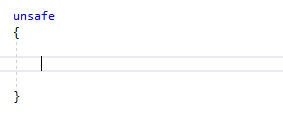
Pointers can only be declared and used in unsafe blocks. C#’s attitude towards pointers is pretty obvious and pointers in C# are rather limited compared to C and C++. While there are some applications, most things that you can do with pointers in C# can be done using something else in C#. With that out of the way we can finally start using pointers.
To declare a pointer variable you need to use the ‘*’ character, putting it after the variable type. Pointers can only point to the same primitive type used during declaration.
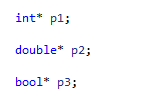
Next we’ll point to some values with our pointers.
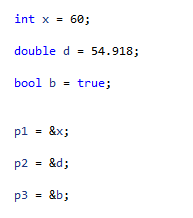
The ‘&’ character is known as the address operator in C# and allows for a variable’s memory address to be accessed. We have taken our pointers and pointed them to the address locations of our variables. Now we’ll perform some operations.
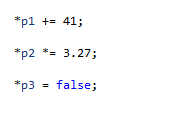
We use the ‘*’ character to dereference our pointers and operate on the variables they are pointing to.
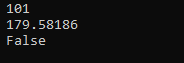
The values have been modified without having to operate on the original variables.
Partial Classes
Partial classes are a very useful feature in C#. It allows for a class to be separated out into multiple components that upon compilation are rendered down into a normal class. These partial classes can even be separated into different files, allowing multiple people to work on them at the same time. And if a class is particularly large you can separate it into different sections for better organization without breaking the class.
The keyword “partial” denotes a class as a partial class. Any partial classes with the exact same name are merged when the program is compiled.
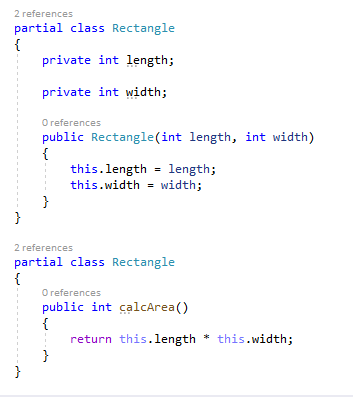
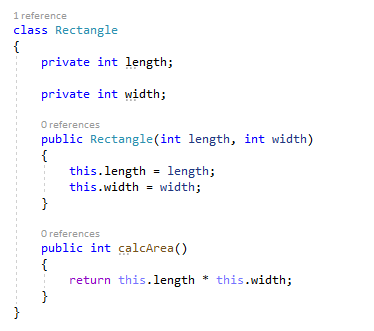
Above are two partial classes called “Rectangle”. The blocks of code are stored in different files but upon compilation the two classes are equivalent to the class below.
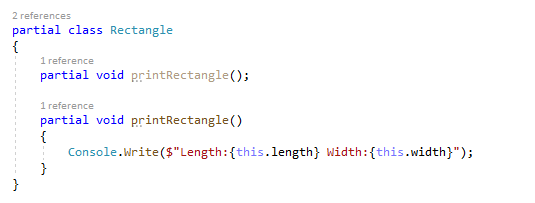
You can even have partial methods which are split into two types, the signature and the implementation. Going back to our Rectangle class, we can create and separate a printRectangle() method. All partial methods must be void and therefore will not return anything.
Partial classes can be very useful if implemented properly and in the next blog I’ll be talking about a very powerful implementation of partial classes in the form of Windows Presentation Foundation (WPF). It utilizes partial classes to make GUI construction very easy.
C# has plenty of useful features and the list could go on and on but I will wrap it up here. Next time we’ll see some advanced features of C#. Hope you enjoyed reading and until next time see ya!
 INTP 362 - Emerging Trends