Java and C# share many similarities and often is it easy to learn the other once you’ve learned one of them.
In this post I will be going over some differences between the 2 languages.
Method Differences
C# retains the curly braces and semicolons that Java uses and the main difference in terms of syntax are the methods.
The following is a side by side comparison of a simple Hello World program in Java and C#
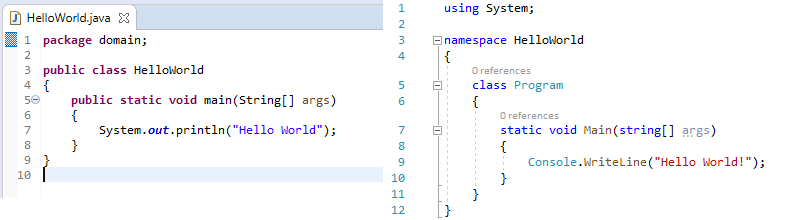
As you can see the structure is pretty much the same between the two. The main difference is in how each language prints to the console. With Java you use System.out.println(); while C# uses Console.WriteLine();
Another thing to make note of is the naming convention of methods. Java methods all start with a lowercase while C# methods all start with an uppercase.
The way in which items are printed the console differ as well. In Java if you wanted to print a string along with a variable you would need to concatenate them with “+”.
System.out.println(“X is: ” + x); where x is an integer.
In C# however, formatting is a lot easier, you can place a “$” in the writeLine() argument method and any variable you want to print out can be placed in a set of curly braces.
Console.WriteLine($”X is {x}”); where is an integer.
This is called String Interpolation and does not have an equivalent in Java.
There is also a C# exclusive feature called a verbatim string literal. It utilizes the @ symbol and changes the behaviour when processing strings. For example, when specifying a file path, the “\” character would need to be escaped by add a “\” in front of it but with @ in C# the program will be instructed to take the string as is.
Without verbatim string literal: string filename1 = “c:\\documents\\files\\text.txt”;
With verbatim string literal: string filename2 = @”c:\documents\files\text.txt”;
Another difference is in how inputs are read from the keyboard. In C# Console.ReadLine() will pause program execution and wait for an input. In Java you must create a new Scanner object with “System.in” as the argument and then call .scanLine() on that object.
import & using
In Java in order to make use of certain objects you would need to import the classes containing that object. To make use of the Scanner object the line “import java.util.Scanner;” would need to be inserted at the top of the class that is using the Scanner object.
In C# the keyword “using” accomplishes this, for example in order to read and write to file “using System.IO” would need to inserted at the top denoting that the class needs to use the classes under System.IO.
Exceptions
Java has two types of exceptions, checked and unchecked. Checked exceptions are checked at compile time and must be handled before the program will compile. Unchecked exceptions are the opposite, they are not checked at compile time. Programmers who use Java must then make the decision to either handle the exception or throw it. However, in C# there are only unchecked expectations and it is up to the programmer on how to handle them.
Getters and Setters vs Properties
A class with private attributes needs getters and setters in order to access those attributes. In Java getters and setters are the only way to access those private attributes but in C# there exists another way, properties. Properties remove the need for getters and setters by introducing a method that acts like a public attribute allowing for the security of keeping private attributes hidden but the ease of use of a public attribute.
Below is a Java class with getters and setters and a C# class with properties.
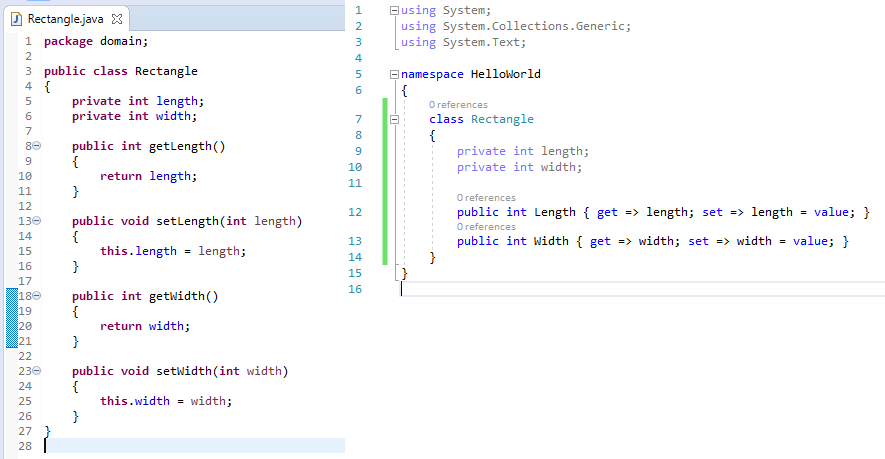
C# can still utilize getters and setters but that boils down to a design choice made by the programmer.
C# and Java have many other differences that I have not highlighted here such pointers, passing by reference, partial classes and many others. But C# feels similar enough to Java that learning one after knowing the other is a relatively simple task.
 INTP 362 - Emerging Trends